:board — the kanban
Aliases: b, bo. Every dispatched task, in the column that says what it's waiting on.
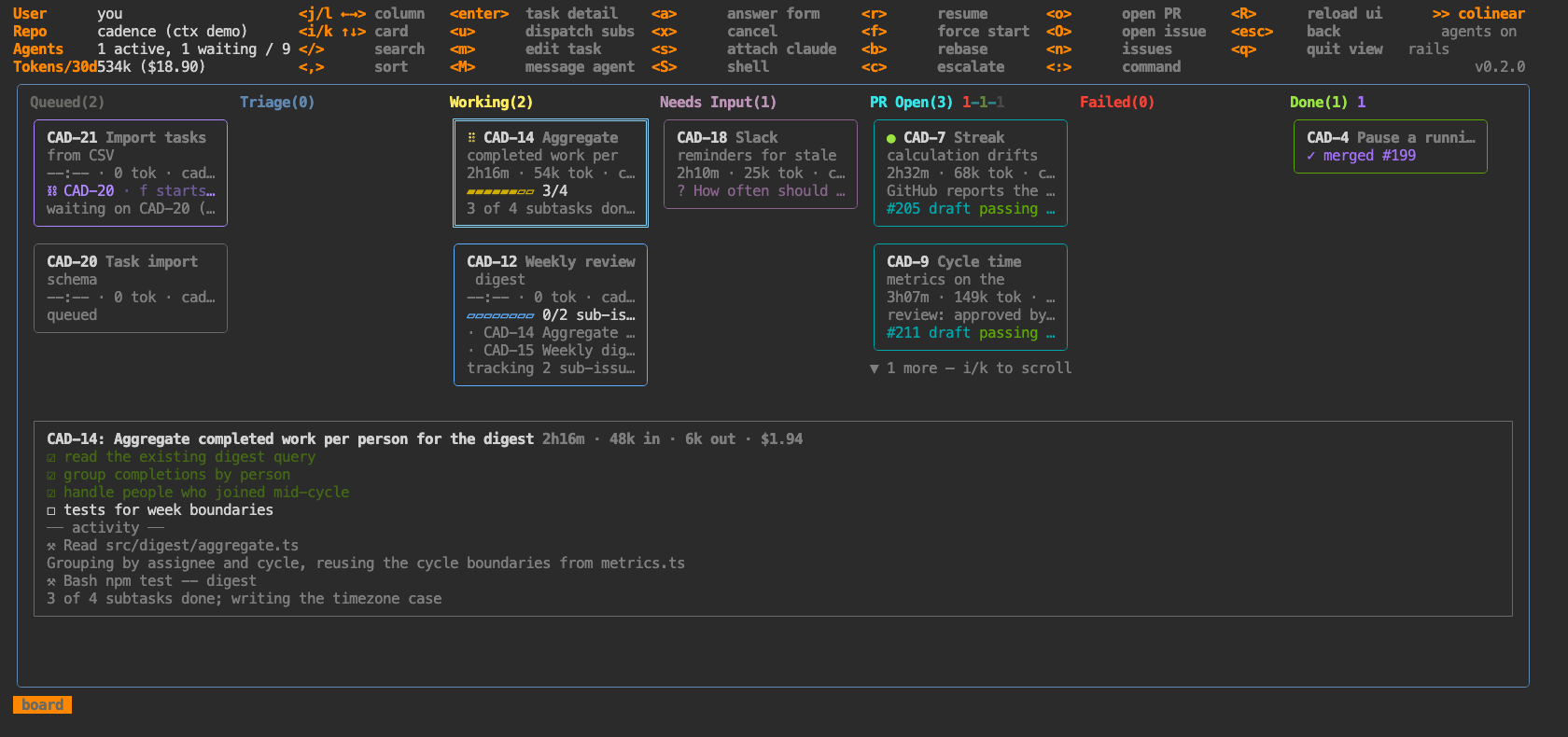
Columns are Queued · Triage · Working · Needs Input · PR Open · Failed · Done. Within a column cards
sort by what wants you first — changes requested, conflicting, approved, draft, awaiting review — and
the header carries a coloured count per state (PR Open(7) 1-1-2-2-1): pink changes-requested, red
conflicting, green approved, grey draft, orange awaiting, purple merged, red closed.
A card shows live duration, tokens, repo, subtask progress, its question if it has one, blocked-by
chains, checks, and each PR with CI and review state. A blinking dot means a maintenance session
is running on an already-open PR — green rebasing, amber fixing CI — rather than the feature being
rewritten. Green is a rebase, amber a CI fix, and a revise dot means it is working through your review of the branch (:diff).
Keys
| key | what |
|---|---|
j l / ← → |
sideways — between columns, or between cards when transposed |
i k / ↑ ↓ |
up and down — between cards, or between statuses when transposed |
t |
transpose: statuses become rows, cards run sideways |
/ |
search — id, title, repo, status, PR state, CI. /conflict, /needs, /failing |
, |
sort within columns |
enter |
task detail |
a |
answer the agent's question (the form) |
1–9 |
pick an option outright, when there's only one question |
m |
edit the task — repo, pinned PR, instructions, model, triage, auto-rebase, auto-dispatch |
M |
message the agent without attaching — a multi-line box; ctrl+d sends, ctrl+q queues without waking |
u |
dispatch this parent's sub-issues (picker) |
s |
attach claude in the worktree · S a plain shell |
x cancel · r resume — or start the agent on a manually dispatched task · f force-start a blocked task · b rebase a conflicting PR |
|
c |
post the triage escalation to the tracker |
o open the PR · O open the issue · n back to issues |
The board and :tasks do the same things with the same keys; only movement differs.
Transposing the board
t turns the board on its side: each status becomes a full-width row and its cards run sideways.
The seven narrow columns become one wide lane per status, so a crowded status shows six cards at
once on a wide terminal instead of two — and a status with nothing in it collapses to a single grey
line rather than holding a column open.
The keys keep their directions. Sideways always moves the cursor sideways, so j/l walk the cards
in a status and i/k change status; empty statuses are skipped either way.
Only whole rows are drawn — a row is as tall as its tallest card, and Ink overflows rather than
clips, so half a row would paint over the detail pane. Expect two or three statuses on screen at a
time, with ▲/▼ counts for the rest. A row with more cards than fit says so in its header
(PR Open(9) 2-1-1 · 1-6 of 9, j/l scrolls) and scrolls as you walk into them.
The choice is remembered: the daemon stores it, so it survives R, a restart, and a reconnect.