:reviews — PRs awaiting your review
Aliases: rev, pr. PRs where your review is requested, across every repo your gh auth can see,
refreshed every five minutes.
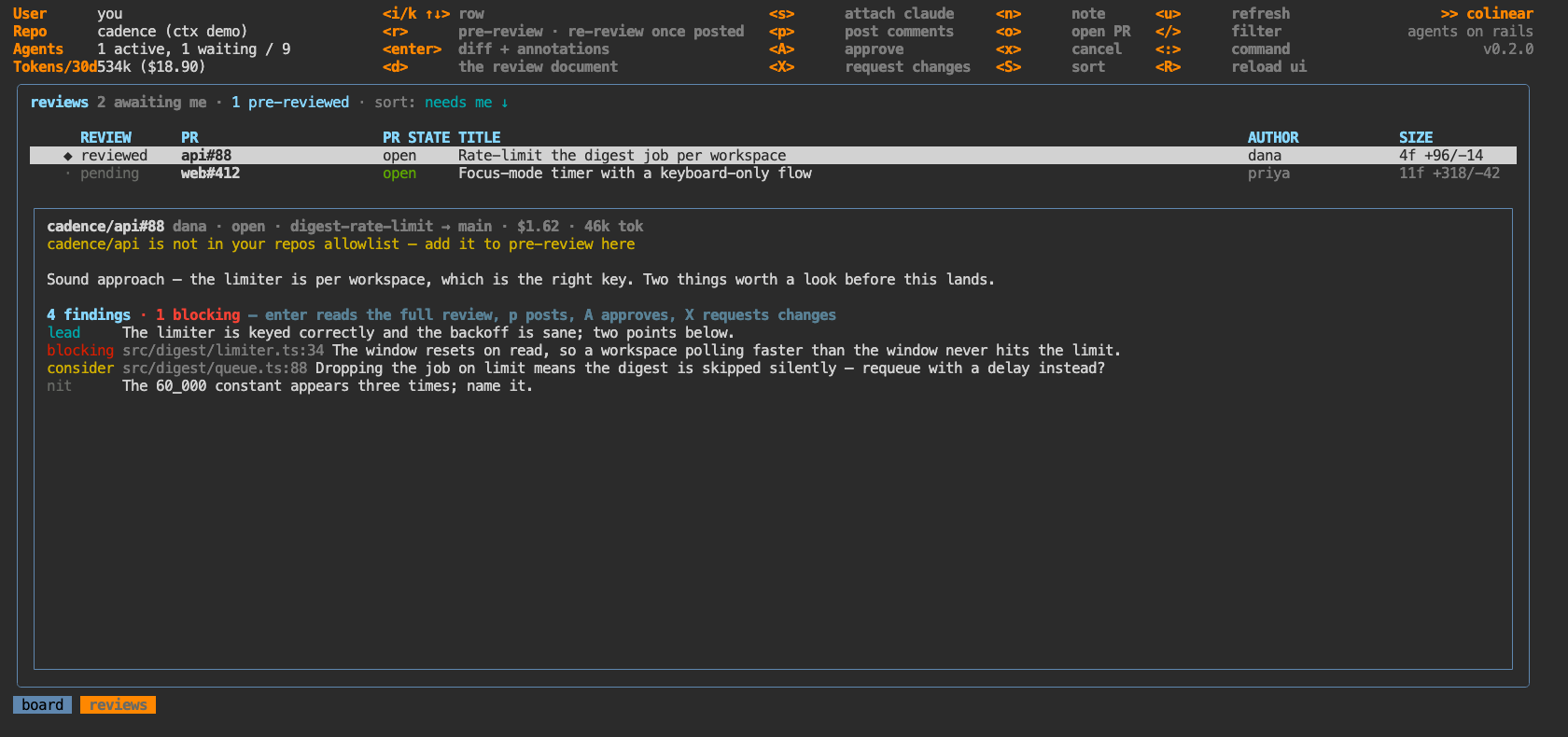
What wants you
Two facts decide whether a row needs you, and neither is the review's status:
● |
you were asked, by name |
○ |
a team you are on was asked — anyone on it can take it |
↻ |
the author has pushed since you reviewed — what you said may no longer apply |
GitHub's review-requested:<you> search returns both kinds, and the PR lists its requested
reviewers: if you are there by name it was asked of you, and if you are not — yet the PR came back
from a search for your requests — it reached you through a team. Naming the team would need an org
scope colinear doesn't ask for, and the distinction doesn't. A team request sorts below work
addressed to you, because it may already be someone else's.
●/○ disappear the moment you post, because submitting a review fulfils the request: the PR
leaves the search while the row stays here. That is the difference between "waiting on you" and "you
have had your say".
↻ compares the PR's current head against the commit your review was posted about (or, before
posting, the one the document was written against). It outranks ● — a review that no longer
applies is more urgent than one not yet started — and sorts to the top under needs me. Pressing
r on it starts round two rather than a fresh review.
The push is also written to the review's activity, once, on the poll that finds it.
Adding a pull request yourself
The list is filled by one search — pull requests asking for your review — which by construction never contains your own: you cannot request a review from yourself. That is the right default, since the list is a queue of what other people are waiting on.
When you do want to read your own work with the same tools, name it:
:reviews jubrad/colinear#104
:reviews https://github.com/jubrad/colinear/pull/104
Anything that names a pull request works — owner/repo#123, owner/repo/pull/123, or the URL you
copied out of the browser. The owner is not optional: 13317 and cloud#13317 name no
repository, and colinear says so rather than doing nothing. An unknown one is fetched and joins the list; a known one is just
selected, as before. Adopted rows carry a + in the flag column and stay until the PR merges or
closes: they were never in the search, so its silence about them means nothing, and the reconcile
that stales a request nobody is waiting on leaves them alone.
Everything else is the same — r pre-reviews it, enter reads it against the diff, findings and
annotations behave identically. The one difference is at the end: GitHub will not let you approve
or request changes on your own pull request, so A and X say so rather than posting into a 422.
p still posts the comments, which is the part worth having on your own PR.
Assisted pre-review
r checks the PR out in a worktree and runs one agent over the diff in context. Progress streams
onto the card. Nothing is posted.
The detail pane shows the review's worktree and its session id as a ready-to-paste
claude --resume — the same handles a task shows, and the way back into a review session from
outside colinear.
Reading it against the code
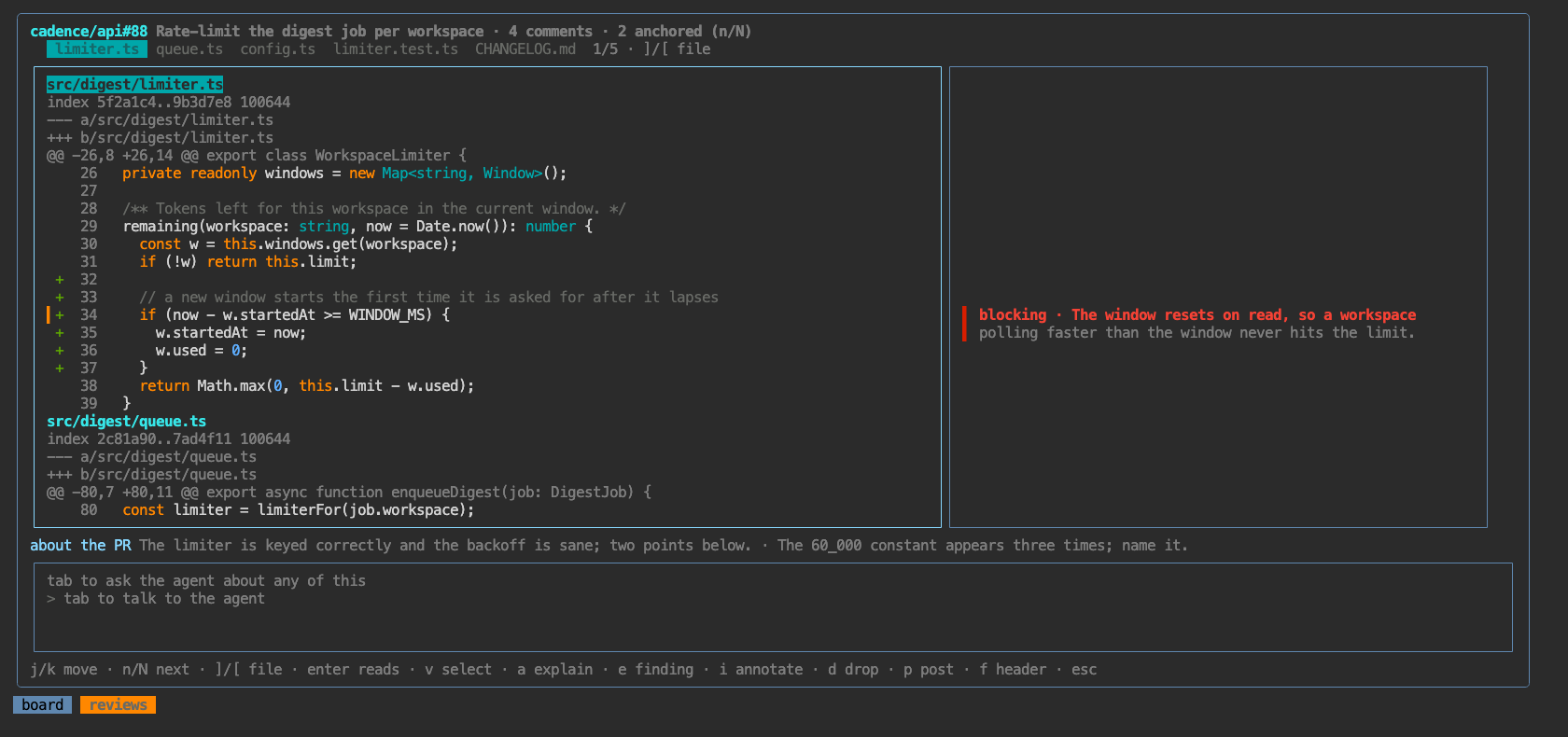
enter opens the annotated diff: the PR's diff on the left, and beside each line what the agent
had to say about it. Chat sits along the bottom.
The code is syntax-highlighted — TypeScript, Go, Rust, Python, SQL, YAML, Markdown and the
JS/TS family, by file extension; anything else stays plain. Add and removed stay legible underneath
it: the +/- sign and the gutter keep green and red, so highlighting owns only the code itself,
and a removed line is dimmed whole. Each file is lexed a hunk at a time, so a comment or string that
runs across several lines is coloured on every one.
The view fills the screen — the board's header steps aside to give the diff the room; f brings
it back if you want the context bar. Across the top is a tab per changed file, the one you are in
lit; ] and [ hop to the next and previous file, and the strip tracks your scroll so it always
says where you are (2/5). It opens at the top of the diff — n/N still walk what the agent
flagged, from wherever you are.
┌ diff ──────────────────────────────┬──────────────────────────┐
│     1  fn reconnect(&mut self) {   │                          │
│ ▍  42 +    for _ in 0..RETRIES {   │ ▌ This retry loop has no │
│     43        self.call()?;        │ ▌ backoff, so a flapping…│
│ ▍  44 +    self.handle = sub()?;   │ │ Re-opens the SUBSCRIBE │
├────────────────────────────────────┴──────────────────────────┤
│ you  why does the casing matter?                              │
└───────────────────────────────────────────────────────────────┘
The right column is a margin: every comment sits at the height of the line it is about, so you
read the two together without looking anything up. A review document read end to end gives you the
findings in the agent's order; this gives them in the code's order, which is the order you check
them in. ▍ marks an annotated line, n/N walk between them, and the view opens on the first one
rather than on a file header.
Two kinds share the margin, told apart by their bar:
▌a comment the agent would send, coloured by severity — red blocking, yellow consider, grey nit, green praise — or cyan for a plain comment of yours (below);│an annotation in blue — severityinfo, which is never posted. Its job is to make your review possible: the context that lets you judge the code rather than a paraphrase of it. The agent is asked for the intent behind a hunk, the invariant it rests on and where that is established, what the change really changes when the diff misleads, and what you should check to satisfy yourself — and asked not to narrate lines that read fine on their own. Blue is deliberately off the red → yellow → green ramp: context is not a mild problem, and any colour on that ramp reads as one.
They live in one list, so an annotation is editable exactly like a comment — and promoting one to a
real severity is how "I had to explain this to myself" becomes "the author should know this". An
info finding is filtered out of the inline comments, out of the body, and out of the severity
counts; a review holding nothing but annotations has nothing to post, and says so. That filtering
happens where the body is rendered rather than at each call site, so no posting path — including
the fallback taken when GitHub rejects a review's inline comments — can leak one.
Long code lines wrap rather than being cut — the end of a line is where a call's arguments and a condition's tail live. A wrapped line keeps its line number on the first row only, and the margin follows: a line that takes three rows pushes the next annotation down by three, so the two stay aligned.
Tabs are drawn as four spaces. A tab is one character to the layout and up to eight columns to the terminal, and on a tab-indented source (Go, Make) that gap wrapped rows at the wrong column, cut the deepest-nested lines shortest, and pushed the code over the annotation pane's border. Four rather than eight keeps a nested Go function inside a pane it shares with the margin.
Each block opens with what it is — blocking ·, nit ·, note · — in the severity's colour,
so two findings on adjacent lines read as two findings rather than one run-on. Continuation rows are
dimmed, which is the other half of the same signal.
A block starts on its line's row, or just after the block above it finishes — whichever is
later. Two findings a line apart cannot both start opposite their own line and both be readable, and
cutting the first one off mid-sentence is the worst of the three ways out, so a crowded block is
pushed down instead of truncated. When a block has moved off its own line it says which line it
belongs to (↑40, or ↓40 if it moved the other way), because that is exactly when you can no
longer read it off the row opposite.
The block you are standing in is the exception to all of it. It is the one you are reading, so it is exempt from the cap that keeps a runaway finding from hiding the rest, and it may climb up the pane to find the rows it needs rather than hanging off its own line and running out of them. A long annotation anchored three rows from the bottom used to show three lines and an ellipsis; now it takes the pane. Move off it and everything returns to where it was.
Nothing is cut against the next finding; a block is only ever shortened by the bottom of the pane.
When even that is not enough, enter reads the current one in full in the right pane — j/k,
g/G and page keys scroll it, it says where you are (16/25), e edits what you are reading,
and anything else returns. A comment about the PR as a whole has no line to sit beside, so it gets
its own line under both panes.
The chat along the bottom sends on enter. Its input grows as you type, up to four rows, so the
start of a long question stays in view while you finish it. Its pane shows the
conversation wrapped in full, not cut at the edge. A new reply is shown from its first line, with a
marker saying how much more there is. tab puts you in the chat and opens it to half the
screen; ↑/↓ and the page keys scroll it, and esc or tab goes back to the diff. After you
send, you stay in the chat so the answer lands where you are looking.
Anything you hand an agent shows that it is working. From the moment you press enter, the pane
shows a spinner, how long the turn has taken, and the last thing the agent reported doing. It reads
sending until the daemon picks the turn up, then thinking until the reply lands. a and c
spin on the lines you asked about in the same way.
The right pane is editable, because the agent's comment is a draft of yours.
e on any line opens one pane with both the level and the comment in it — you start typing
straight away, and tab moves the keyboard up to the level row (blocking · consider · nit · praise ·
comment · annotation) and back down to the text. No separate picker step: set the level before, during
or after writing, whichever you reach for. On the level row, a kind's first letter picks it, except
m for comment, since c is consider.
comment is for what isn't a judgement: a question for the author, a note, a "ping me when the
follow-up lands". It is posted like any other comment, but nothing labels it. The verdict's count
leaves it out ("Looks good, 1 nit" doesn't become "1 nit, 2 comments"). One with no line to anchor
to goes in the review body as a plain paragraph, without the bold severity the others carry. The
agent never writes one, and in round two it keeps yours word for word, dropping one only when the
conversation shows it was answered.
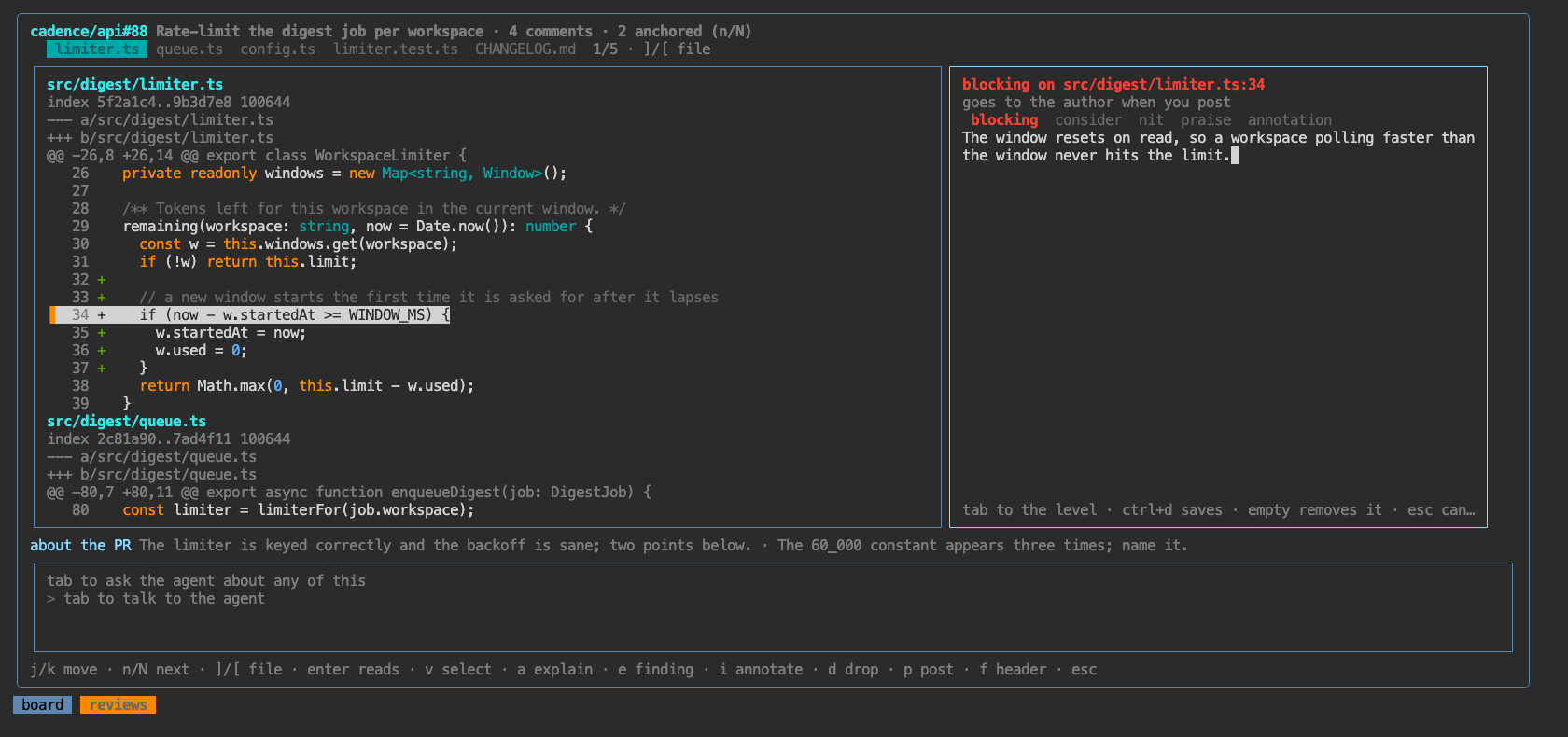
The pane names the level and what happens to it — "goes to the author when you post", or "stays in
colinear — never posted" — because that is the difference that matters. Editing an existing finding
opens with its level already selected. ctrl+d saves, an empty comment removes it, and d drops one
outright. i opens the same pane pre-set to an annotation — the common case while reading
unfamiliar code — still one tab from any other level. Every edit rewrites the ``findings fence in
the review document, so what you post and what the agent sees never diverge — a later chat turn reads
your wording, andp` posts it.
A line can hold more than one finding. A comment and a note on the same line, two findings from
the agent, or a block that covers a line with its own comment are all normal. The margin draws
everything anchored on a line as one stack, numbered 1/2, 2/2. The diff's marker column shows
the count instead of ▍, and the footer says 1/2 on this line. n/N step through a line's
findings before moving to the next line, and inside the reader (enter) they move between them
without leaving it. e, d and enter act on the selected finding. i edits the line's note if
there is one, and otherwise adds a new note beside what's there. Before, a note added to a commented
line replaced the comment.
The keys, in one place
The flow above spread across a few pages; this is the whole of it. Everything except p and tab
acts on the line under the cursor, or on the marked block when there is one.
| key | what |
|---|---|
j/k arrows |
move a line · space/pageup a page · g/G top and bottom |
n N |
the next and previous finding: each one on a line in turn, then the next line |
] [ |
hop to the next / previous changed file |
enter |
read the current finding in full, scrolling inside it |
v |
mark a block — move to grow it, v or esc to drop it |
e |
write a finding — level and comment in one pane, tab between them |
i |
the same pane, pre-set to an annotation: the line's note if it has one, otherwise a new one beside the rest |
a |
ask an agent what the marked lines do — the answer lands as an annotation |
c |
ask about the marked lines your own way — pick a model, write the request |
d |
drop the selected finding, block and all |
ctrl+d |
save what you are writing · an empty comment removes it |
p post · A approve · X request changes — the same as from the list |
|
tab |
talk to the reviewing agent · in compose, switch level ⇄ comment · esc back to the diff, then out |
f |
full screen on/off (the header) |
The task-side view, :diff, has the same keys against your own agent's branch — the one
difference being where p sends them.
Commenting on a block
A comment is often about a passage, not a line: the loop rather than its first statement. v
marks a block — press it, move, and the range grows with the cursor; ▏ runs down the gutter
beside every line in it and the header says what is marked (▏41–43 selected). v again or esc
drops it, and esc drops the selection before it closes the view.
With a block marked, e writes one finding across the whole range and d removes it whole. It is
stored — and posted — the way GitHub stores a multi-line comment: anchored to the last line,
with the first recorded as its start. That is why the picker and the editor name the range rather
than the cursor; mark upward from 43 to 41 and the finding is still on 43.
In the margin the block is marked on every line it covers, so its extent is visible in the diff, while the text hangs off the anchor row alone rather than being drawn once per line.
Asking what a passage does
a hands the marked lines to an agent and asks it to explain them, as an info annotation on
that range — the same annotation a review writes unprompted, asked for on demand while you are
reading. It is a short, focused session rather than a whole review: it reads those lines and enough
around them to answer properly, appends one finding to the review document, and changes nothing
else.
The row you asked about holds itself open with a spinner (⠋ explaining these lines…) until the
answer lands, which it does in place, in the margin, beside the code — the view follows the document
rather than waiting for you to reopen it. A session that dies writes nothing, so after five minutes
the row says no explanation came back — see :logs instead of spinning for the rest of the day.
a with nothing marked asks about the line under the cursor.
Asking with a model and a request
c is a with a popup first, the same one c opens from the list. Pick a model, then write
what you want to know: is this safe under cancellation?, why not a map here?, review this for
races. The session reads the marked lines and what is around them, then answers that request
rather than giving a general explanation. The row holds a spinner (asking about these lines…)
until the answer lands in the margin, exactly as with a.
A question gets an info annotation, which is never posted. When you ask for a critique and the
agent finds a real problem, the answer comes back as an ordinary finding (blocking, consider or
nit). It sits with the rest, for you to edit, drop or post. Finding nothing is an annotation that
says so.
The choice applies to this ask only. The model starts on the review's own (the one set with
c from the list, if any), and default means that one. Nothing is kept for the next ask.
d from the list opens the document itself instead — the agent's prose write-up with the same
chat beside it (tab switches, j/k scrolls the document and ↑/↓ or the page keys scroll the chat, e edits it in $EDITOR). Your turn resumes the
reviewing session, so the PR is still in context; when the agent needs a decision it asks in the
same pane.
The checkout is disposable
A review worktree tracks the pull request and holds nothing of yours, so colinear resets it forcibly rather than asking. That matters after a run that died partway through updating it: without the reset, the leftover modifications refuse every later checkout and the review can never be refreshed again.
Colinear also runs its own git commands with submodule.recurse off. If you have that on — a
reasonable thing to want, and not colinear's to change — a checkout inside a linked worktree tries
to set the submodules up there too, and git's support for that is incomplete: it leaves a .git
pointer and a stub gitdir with nothing in it, after which every git command in that worktree,
status and diff included, fails with not a git repository. A review that has already been
wedged that way is repaired on the next r: a submodule pointing at a gitdir that is not a
repository is put back to uninitialised, which is what a fresh worktree has anyway. Colinear reads
the pull request's own diff and never wants submodule contents.
Round two
Press r again on a review you have already posted and it does something different: instead of
reviewing the PR from scratch, it revises the review you sent. The worktree is reset to the new
head, the reviewing session is resumed — so it remembers what it said and why — and it is handed
two things it could not otherwise know:
- what landed since, as the commits after the exact SHA the author received feedback on (recorded when you posted), so the diff it reads is the response to your comments rather than the whole PR again;
- the conversation, inline comments and general discussion, fetched with
gh apirather than by asking an agent to go and look — replies to your own comments are marked as such.
It then goes through the existing findings and decides which are fixed, which were answered (the author explained, and was right), which still stand, and what is new — dropping the first two rather than keeping them alive to look thorough, and engaging with the pushback on the third rather than restating the original comment. The document is rewritten whole each round, so what you see is what round two would post.
p then posts the revised review as a second one on the PR.
A different model, your own instructions
c is r with a popup first. It runs the same thing r would: a pre-review, or round two once
you have posted. Before it starts, you pick:
- a model, from the ones your runtimes offer.
defaultis the config'sreviewmodel, and the popup says which one that is. - instructions for this review. Write what to concentrate on, what to leave alone, or how hard
to push. They go into the prompt ahead of your standing
guidance.review, which still applies.
Both are kept on the review, so a plain r afterwards runs the same way. The chat,
re-anchoring and "what does this do" all run on that model too, because they continue the same
conversation. The review's detail pane shows what is set, and c changes or clears it.
A conversation belongs to the runtime that wrote it. Round two on a model from the same runtime resumes the session as usual, just on the new model. A model from another runtime can't open it, so round two starts a fresh session there. That session reads the posted review first and revises it as its own. The thread and the commits since you posted are handed over exactly as before.
Adopting a pull request
:reviews owner/repo#123 (or the URL) puts a pull request on the list that nobody asked you to
review. It stays there until the PR settles, rather than being dropped by the next sweep the way an
unasked-for one would be.
Adopting one that is already on the list and settled brings it back. The sweep marks a review
stale when the PR stops asking for you, and adopting is you saying otherwise — so the status
comes back to pending, or to ready when a review had already been written for it. Every other
status is yours and is left exactly as it is: a posted verdict stays posted, a session in flight
stays in flight.
Reviews that got stuck this way before are recovered at the next daemon start, so they do not need re-importing.
When the branch has moved under you
The annotated diff is read out of the review's own checkout, pinned at the sha the agent read. That is deliberate: the margin's comments are anchored to those lines, and re-reading a newer diff underneath them would point every one of them somewhere else.
So when the author pushes, the diff stays right about the review and stops being the whole pull
request. It used to say nothing, which looked exactly like a diff that had been cut short. Now the
header says which sha you are looking at, which one the branch is on, and that r re-reviews at
the new head — which refetches pull/<n>/head, resets the checkout and reads it again.
Posting
p posts, A approves, X requests changes — the same review with a different event. Posting is
deterministic, not agentic: the findings are already structured, so colinear clears any leftover
pending review of yours and makes the gh api call itself. It costs no tokens and either works or
says why.
What actually gets sent is deliberately small:
- inline comments — one per finding with a file and a line, opening with its severity in bold
(
**nit** — …). Acommenthas no label - the body — one line, the shape you would type yourself: the lead finding's verdict (no file,
no line, a few words on whether it is ready) with the count by severity folded in —
Looks good — 1 nit.,Solid, but one thing to fix — 1 blocker, 2 considerations.— then each finding with no line as its own paragraph, and your note. The agent is told the lead never describes the PR or narrates what it checked: the author wrote the change, and the checking is for you, in the document prSignoffattributes what the agent wrote, and never your own words. See who wrote it
Who wrote it
Every finding records whether it is yours or the agent's, and that decides where prSignoff
goes. A finding the review session wrote is the agent's. A comment you add with e is yours.
Rewording one of the agent's leaves it the agent's, because a light edit doesn't make the thinking
yours. In the compose pane, the line under the level row says which it is and what that means
("signed with your prSignoff", "posted as yours, unsigned"). s on the level row flips it. In
the margin, yours are marked (you).
prSignoffScope |
the agent's inline comment | your inline comment | the body |
|---|---|---|---|
all |
signed | unsigned | signed when it carries the agent's words: its verdict, or a finding with no line |
body |
unsigned | unsigned | signed when the agent wrote any of the review |
A bare A or X with no review written is entirely yours, so it goes up unsigned. The agent is told
never to write the field, and to keep it on any entry that has it when it rewrites the document in
round two.
The document's prose is written for you, to decide what to send. It never leaves your machine.
When the anchors have gone stale
GitHub rejects a review entirely if any one comment names a line that is not part of the diff, and the ordinary way to get there is the author pushing after the review was written. Colinear used to fall back to putting every finding in the body — which posted a shape nobody chose, and once put annotations onto a real pull request.
Now nothing is posted. The rejection is recognised as what it is, any pending review is cleared, and the review goes back to the agent that wrote the anchors: the checkout is fetched forward to the PR's current head, and the agent is handed the commits that landed and the exact findings that were rejected, to re-anchor them against the diff as it is now. A finding whose code has left the diff can move to a line the diff does touch, or lose its anchor and ride in the body instead.
You get a note in the chat, and p posts again once you have read what changed. Nothing reaches
GitHub on that path — not the review, not a comment. Every other kind of failure (auth, a closed PR,
the network) still just fails and says so, because re-anchoring cannot help with any of them.
Keys
| key | what |
|---|---|
r |
pre-review · re-review once posted · x cancel one · u refresh the list |
c |
the same, on a model and with instructions you pick — kept on the review |
enter |
the annotated diff · d the review document |
p post · A approve · X request changes · n attach a note that rides along |
|
s |
hand the terminal to that review's claude session |
S |
sort: needs-me / updated / size / repo / author / cost (again reverses) |
o |
open the PR |
H |
hide this PR from the list, or put a hidden one back |
h |
show everything, settled and hidden, and go back to the live list |
Every live review follows its PR, on the same five-minute poll as the list: draft or ready,
title, size, head, last update. The search for review requests refreshes the reviews it returns.
Everything else still live is read back from GitHub in batches: PRs you added yourself, ones you
have already reviewed, ones a session is busy with. Marking a PR ready (or back to draft) outside
colinear shows up within one poll, with a line in the review's activity. u polls now.
A posted review stays on the list while its PR is open — submitting a review fulfils the review request on GitHub's side, so the list can't rely on the request alone, and checks the PR itself before letting go. When the PR merges or closes, the review settles to stale and its worktree is reclaimed — not when it's posted, since the author may push again.
Settled reviews are hidden, not gone. Retention keeps them for retentionDays, so there are
usually far more of them than live ones, and a list of everything would bury the work. The header
always says how many are being held back, so a short list tells you what it is not showing, and
h shows them. Filtering with / still narrows whichever set you are looking at.
H hides a PR you are not going to review. It goes the way a settled one does: off the list,
out of :todo, and counted in the header ("2 hidden by you"). h shows it again, dimmed and marked
-, and H on it puts it back. Hiding lasts until you undo it. A new push or another review
request does not bring it back, because a team re-requesting is not a reason to start. Naming it
with :reviews owner/repo#123 does.
Reviews staled by the old behaviour recover on their own: once per daemon start, stale reviews whose PR is still open and carries a review of yours get their status back from GitHub's record.